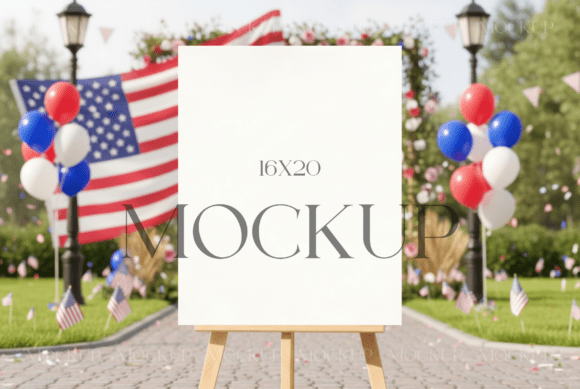
Elevating Brand Presentation with a Minimalist Wedding Poster Mockup PSD
In the competitive landscape of digital design and wedding stationery, presentation is often the deciding factor between a browser scrolling past and a client making a purchase. For graphic designers, Etsy shop owners, and independent creatives, the ability to showcase work in a realistic, high-quality context is not merely an aesthetic choice—it is a fundamental business requirement. This is where a Minimalist Wedding Poster Mockup PSD becomes an indispensable tool in your workflow. By bridging the gap between flat digital files and tangible physical products, these mockups allow creators to demonstrate the potential of their designs with clarity and professionalism.
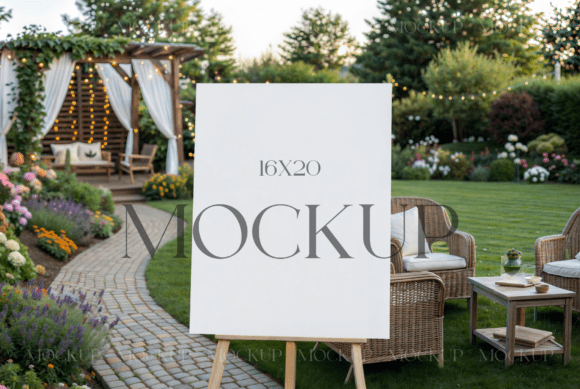
The shift toward minimalist aesthetics in wedding decor has been significant over the last decade. Couples are increasingly favoring clean lines, ample white space, and understated elegance over ornate, cluttered designs. Consequently, designers need tools that reflect this modern sensibility. A well-crafted mockup does more than display an image; it simulates the lighting, texture, and perspective of a real-world environment. When you utilize a versatile vertical poster template, you are providing potential clients with a visual anchor, helping them imagine how your bridal shower seating charts or welcome boards will look in their actual venue.
The Practical Value of Smart Object Technology
The core functionality of any high-quality mockup lies in its usability. The Minimalist Wedding Poster Mockup PSD discussed here leverages Adobe Photoshop’s Smart Object technology, which is the industry standard for non-destructive editing. This feature is critical for professionals who manage high volumes of client work. Instead of manually warping, shading, and perspective-matching every new design—a process that can take hours—Smart Objects allow for instantaneous updates.
The workflow is streamlined and efficient. You simply launch Photoshop, double-click the designated Smart Object layer, and drag your custom graphic onto the template. Once you adjust the image size to align with the card’s dimensions and save your work, the main file updates automatically. This automation ensures consistency across your portfolio. Whether you are creating a series of social media posts or updating your online store listings, the lighting and shadows remain uniform, reinforcing your brand identity. Furthermore, the compatibility with Photopea, a free browser-based editor, makes this tool accessible to freelancers or hobbyists who may not have a subscription to Adobe Creative Cloud, thereby widening its utility across different user segments.
Visual Quality and Technical Specifications
When evaluating digital assets, technical specifications are just as important as visual appeal. A low-resolution mockup can undermine the perceived value of even the most exquisite design. This particular template delivers a JPG file at 4000x3000 pixels with a resolution of 300 DPI (dots per inch). This high resolution is essential for two reasons. First, it ensures that the mockup looks crisp and detailed on high-density retina displays, which are common among modern consumers. Second, it allows for large-format printing if you wish to use the mockup in physical marketing materials, such as brochures or portfolio books.
The "boho wedding easel sign" aesthetic mentioned in the product description taps into a popular niche within the wedding industry. Bohemian styles often incorporate natural elements, soft textures, and organic shapes. A mockup that accurately reflects these nuances—through realistic wood textures on the easel or subtle ambient lighting—adds a layer of authenticity. It moves the presentation from a sterile digital composite to a warm, inviting scene. This emotional connection is vital in the wedding market, where buyers are purchasing not just a product, but a feeling and a memory.
Who Benefits Most from This Asset?
While the primary audience for a Minimalist Wedding Poster Mockup PSD is obviously graphic designers specializing in wedding stationery, the utility extends to several other professional groups.
- Etsy and E-commerce Sellers: For small business owners, the product image is the primary sales driver. A generic flat lay may not suffice in a saturated market. Using a contextual mockup helps listings stand out in search results and increases click-through rates.
- Wedding Planners and Coordinators: Professionals in this field often create custom signage for clients. Being able to present a realistic preview of the welcome board or seating chart during the consultation phase can help secure bookings and manage client expectations.
- Marketing Agencies: Agencies handling accounts for bridal boutiques or event venues can use these mockups to create cohesive social media campaigns that resonate with the target demographic’s aesthetic preferences.
- Serious Hobbyists: Individuals designing invitations for their own weddings or those of friends can benefit from the professional finish these templates provide, allowing them to visualize the final product before sending files to print.
Usability and Workflow Integration
Integrating this mockup into your existing workflow requires minimal adjustment. The file structure is typically organized, with clearly labeled layers. This organization is crucial for maintaining efficiency. When you receive the PSD file, you will find the Smart Object layer prominently placed. The process of adding your graphics is intuitive: open the smart object, place your 16x20 design, adjust for fit, and save. The system handles the complex rendering of shadows and highlights, ensuring that your design appears to sit naturally on the easel.
However, users should be aware of certain limitations. As noted in the terms, this is a digital file only; no physical item is shipped. Additionally, the stationery designs shown in preview images are for display purposes only and are not included in the purchase. This is a standard practice in the digital asset industry, but it is important for new users to understand that they are buying the container, not the content. You must supply your own artwork. Furthermore, while you are allowed to modify the image and apply filters to align with your branding, reselling the mockup itself is strictly prohibited. These terms protect the creator’s intellectual property while granting you broad freedom to use the asset for commercial and personal projects.
Long-Term Value and Return on Investment
From a financial perspective, purchasing a high-quality mockup is a low-cost investment with potentially high returns. Consider the time saved by not having to photograph physical samples for every new design. Hiring a photographer, sourcing props, renting studio space, and editing photos can cost hundreds of dollars and days of labor. In contrast, a digital mockup costs a fraction of that amount and can be reused indefinitely. Over the course of a year, a single versatile template can generate dozens of unique product images, each tailored to a specific client or campaign.
Moreover, the consistency provided by using a standardized mockup contributes to brand recognition. When customers see your products presented in a uniform, high-quality style across different platforms, it builds trust and perceived professionalism. This is particularly important for new businesses trying to establish credibility in a crowded marketplace. The ability to quickly iterate on designs—testing different color palettes or typography styles against the same background—also facilitates better creative decision-making. You can A/B test different visuals to see which resonates more with your audience, all without the logistical hassle of physical production.
Making the Right Choice for Your Needs
Before purchasing any digital asset, it is wise to assess whether it fits your specific needs. If your brand leans towards vibrant, maximalist designs, a minimalist boho easel might not be the best fit. However, if your target audience values elegance, simplicity, and modern rustic charm, this Minimalist Wedding Poster Mockup PSD is an excellent choice. It is particularly effective for showcasing typography-heavy designs, where the clean background ensures that the text remains the focal point.
It is also worth noting the refund policy. Due to the nature of instant digital downloads, refunds are generally not permitted. This underscores the importance of reviewing the preview images and descriptions carefully before purchase. Ensure that the aspect ratio (16x20) matches your typical design outputs. If you frequently work with square or landscape orientations, you may need to crop your designs or seek additional templates. However, for vertical posters, welcome boards, and seating charts, this format is ideal.
In conclusion, the Minimalist Wedding Poster Mockup PSD is more than just a pretty picture; it is a functional tool that enhances the way designers present their work. By combining technical precision with aesthetic appeal, it empowers creators to showcase their talents effectively. Whether you are a seasoned professional looking to streamline your workflow or a newcomer aiming to make a strong first impression, integrating high-quality mockups into your strategy is a step toward greater success in the digital marketplace.